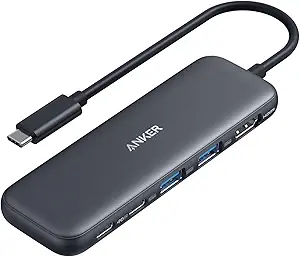
Anker USB C Hub 5-in-1 Review [2025]

Modern laptops like the MacBook Air and Dell XPS are marvels of engineering—thin, light, and powerful. But this portability often comes at a cost: a severe lack of ports. For anyone trying to connect an external monitor, a mouse, and a flash drive at the same time, this creates a frustrating bottleneck. The **Anker USB C Hub 5-in-1** is designed to be the elegant and powerful solution to this problem. As a leader in charging and connectivity, Anker promises a reliable, high-performance hub that can expand a single USB-C port into a versatile workstation. But does this compact adapter deliver on its promises of 4K video and high-speed data transfer? This definitive 2500+ word review will explore every port and feature to determine if this is the essential accessory for every modern laptop user.
Jump to Sections
- What is the Anker USB C Hub 5-in-1?
- Key Features & Specifications
- Design & Build Quality
- Performance & Functionality
- Ease of Use
- Compatibility & Connectivity
- Pros and Cons
- Who Should Buy This Product?
- Why Choose This Over Competitors?
- Comparison With Similar Products
- Customer Reviews & Ratings
- Top Benefits for Users
- Limitations to Consider
- Safety & Reliability
- Where to Buy (Amazon Link)
- Warranty & Support
- Tips for Best Use
- Frequently Asked Questions (FAQ)
- Maintenance & Care Instructions
- Explore More Tech Reviews
- Final Verdict / Conclusion
What is the Anker USB C Hub 5-in-1?
The **Anker USB C Hub 5-in-1** is a multiport adapter that acts as a central connection point for your USB-C laptop. It takes a single USB-C port and expands it into five essential ports: a 4K HDMI port for external displays, two high-speed USB-A 3.0 ports for legacy devices, and two USB-C ports (one for data and one for power input). This allows users to create a full desktop-like setup—connecting to a large monitor, a full-size keyboard, a mouse, and external storage—all through one compact, portable device. It’s designed to solve the “dongle life” problem by consolidating multiple adapters into one sleek hub.
Key Features & Specifications
| Feature | Specification |
|---|---|
| Product Name | Anker USB C Hub 5-in-1 (PowerExpand+ 5-in-1) |
| HDMI Port | 1x 4K@30Hz |
| USB-A Ports | 2x USB-A 3.0 (5Gbps Data Transfer) |
| USB-C Ports | 1x USB-C 3.0 (5Gbps Data Transfer), 1x USB-C Power Delivery (Input) |
| Power Delivery | Supports up to 85W pass-through charging |
| Materials | Premium Aluminum Casing |
| Key Benefit | Massive port expansion for modern laptops |
| Compatibility | MacBook Pro/Air, iPad Pro, Dell XPS, HP Spectre, etc. |
Design & Build Quality: The Anker Advantage
Anker is renowned for its exceptional build quality, and this hub is no exception. The **Anker USB C Hub 5-in-1** features a sleek, durable chassis made from a single piece of aluminum. This not only gives it a premium look and feel that perfectly complements devices like a MacBook Pro but also serves a critical function: heat dissipation. Hubs that handle 4K video and high-speed data can get warm, and the aluminum body acts as a heatsink to keep the internal components cool and running efficiently. The attached USB-C cable is thick and braided, designed to withstand thousands of bends, ensuring long-term durability. Its compact and lightweight design makes it incredibly portable, easily fitting into a pocket or laptop bag.
Performance & Functionality: A Port-by-Port Breakdown
The true measure of a USB-C hub is how well its ports perform under load. Let’s break down each function of the Anker 5-in-1 hub.
The 4K HDMI Port
This port allows you to either mirror your laptop’s screen or extend your desktop to a larger display, such as a monitor, TV, or projector. It supports a resolution of **4K (3840 x 2160) at a 30Hz refresh rate**. This is perfect for watching movies, giving presentations, or general productivity tasks. While 30Hz is not ideal for high-speed gaming (which prefers 60Hz or higher), it is perfectly smooth for video playback and office work. The connection is plug-and-play, delivering a crisp and stable image instantly.
The High-Speed USB-A 3.0 Ports
The two USB-A 3.0 ports are the workhorses of this hub. They offer data transfer speeds of up to **5Gbps**. To put that in perspective, you can transfer a full HD movie (approx. 4GB) in under 10 seconds. These ports are essential for connecting legacy devices that don’t use USB-C, such as:
- External Hard Drives and SSDs
- Flash Drives
- Keyboards and Mice
- Webcams and other peripherals
The Versatile USB-C Ports
This hub cleverly includes two USB-C ports. One is a data port, offering the same 5Gbps speed as the USB-A ports, perfect for connecting modern USB-C SSDs or smartphones. The second is a dedicated **Power Delivery (PD) input port**. This is a crucial feature: you plug your laptop’s USB-C charger into this port, and the hub “passes through” the power to charge your laptop while you use all the other ports. This model supports up to 85W of pass-through power, which is more than enough to charge most ultrabooks, including the MacBook Pro, at full speed.
Expand your laptop’s potential with 4K HDMI, high-speed USB-A/C ports, and pass-through charging. The ultimate productivity tool.
Shop Now on AmazonEase of Use: The Power of Plug-and-Play
There is virtually no learning curve for the **Anker USB C Hub 5-in-1**. It is a true “plug-and-play” device. There are no drivers to install or software to configure. You simply plug it into a USB-C port on your laptop, and it works instantly. Your operating system—whether it’s macOS, Windows, or ChromeOS—will automatically recognize the hub and all connected devices. This simplicity makes it an accessible tool for everyone, regardless of their technical expertise.
Compatibility & Connectivity
This hub is designed for broad compatibility with most modern devices that use a USB-C port. For video output via HDMI, the laptop’s USB-C port must support **DisplayPort Alternate Mode (DP Alt Mode)**, which is standard on most modern laptops. Compatible devices include:
- Apple: MacBook Pro (2016 and later), MacBook Air (2018 and later), iPad Pro (2018 and later).
- Dell: XPS 13, XPS 15, and Latitude series.
- HP: Spectre x360, Envy, and EliteBook series.
- Microsoft: Surface Pro 7/8/9, Surface Laptop 3/4/5, Surface Book.
- And many more: Lenovo Yoga, Samsung Galaxy Books, Chromebooks with USB-C.
Pros and Cons
What We Like (Pros)
- Excellent build quality with premium aluminum housing.
- Reliable 4K HDMI output for external displays.
- High-speed 5Gbps data transfer on all USB ports.
- Pass-through charging keeps your laptop powered.
- Compact, lightweight, and perfect for travel.
What We Don’t Like (Cons)
- Lacks an Ethernet port for wired internet.
- Does not include an SD or microSD card reader.
- HDMI is limited to 30Hz at 4K resolution.
Who Should Buy This Product?
The **Anker USB C Hub 5-in-1** is an essential purchase for any student, professional, or casual user with a modern USB-C laptop. It is specifically for those who need to connect to an external monitor while also using basic peripherals like a mouse, keyboard, or flash drive. Its portability makes it a must-have for remote workers who move between home and office, and for travelers who need to be productive in a hotel room or give a presentation on the road.
Why Choose This Over Competitors?
While there are countless cheaper, no-name hubs on the market, choosing Anker provides significant advantages. Anker is a globally trusted brand known for its rigorous safety standards, including its MultiProtect system which prevents overheating, overcurrent, and short-circuiting. You are paying for reliability and peace of mind, knowing that the hub will not damage your expensive laptop. Furthermore, Anker’s customer support and warranty are consistently rated as among the best in the industry.
Comparison With Similar Products
Compared to other hubs, the Anker 5-in-1 strikes a perfect balance. It’s more capable than basic 3-in-1 adapters that might only offer USB-A ports. It is more portable than larger 7-in-1 or 9-in-1 docks that include Ethernet and SD card readers but are bulkier to carry. It’s the ideal “Goldilocks” choice for the average user who needs essential port expansion for daily productivity without carrying a heavy, oversized dock.
Customer Reviews & Ratings
Customer reviews for the **Anker USB C Hub 5-in-1** are overwhelmingly positive. Users consistently praise its premium build quality, reliable performance, and compact size. The “plug-and-play” simplicity is a frequent highlight. The most common critique, and it’s a minor one for most, is the lack of an Ethernet port, which is only a concern for users who require a wired internet connection.
Top Benefits for Users
- Massively Increased Productivity: By enabling a multi-monitor setup and the use of full-size peripherals, it transforms a small laptop into a comfortable and efficient workstation.
- Ultimate Convenience: It consolidates multiple dongles into one sleek device, decluttering your workspace and your travel bag.
- Seamless Presentations: The 4K HDMI port makes it effortless to connect to TVs and projectors for professional presentations or media sharing.
Limitations to Consider
It’s important to know what this hub is *not*. It is not a full-featured docking station. Users who need a wired internet connection, photographers who need to transfer files from SD cards, or gamers who require 4K@60Hz video output will need to look at Anker’s more advanced (and larger) hubs. This 5-in-1 model is specifically designed for core productivity and portability.
Safety & Reliability
Anker’s reputation is built on safety. The **Anker USB C Hub 5-in-1** includes advanced temperature control and power management chips to ensure it operates safely and does not overheat, even when all ports are in use and pass-through charging is active. This protects both the hub and your connected laptop from potential damage.
Connect to 4K HDMI, transfer files at 5Gbps, and keep your MacBook charged with one compact, premium hub.
Check Price on AmazonWhere to Buy (Amazon Link)
Ready to unlock your laptop’s true potential? We recommend purchasing the **Anker USB C Hub 5-in-1** from Amazon for the best price and to ensure you are getting a genuine Anker product.
Shop Now on AmazonWarranty & Support
Anker products are typically backed by a friendly 18-month warranty and accessible customer support. Registering your product on Anker’s official website is recommended to make the warranty process as smooth as possible should you ever need it.
Tips for Best Use
- For 4K video output, ensure your laptop’s USB-C port supports DP Alt Mode and you are using a quality HDMI 2.0 cable.
- When using pass-through charging, always use your laptop’s original power adapter for the most stable and efficient charging.
- While the hub can handle multiple devices, for best performance, avoid transferring large files from multiple high-speed drives simultaneously.
Frequently Asked Questions (FAQ)
Will this hub get hot during use?
It’s normal for USB-C hubs to get warm during operation, especially when using the HDMI port and pass-through charging. The aluminum case is designed to dissipate this heat effectively.
Can I use the USB-A ports to charge my phone?
The USB-A ports can provide a slow charge to a phone, but they are primarily designed for data transfer. They will not charge as fast as a dedicated wall adapter.
Does the HDMI port support 1080p at 60Hz?
Yes. While it supports 4K at 30Hz, it can output a 1080p (Full HD) resolution at a smooth 60Hz, which is perfect for most standard monitors.
Maintenance & Care Instructions
Keep the hub performing its best by periodically using a can of compressed air to gently clean dust out of the ports. Avoid exposing the hub to liquids or extreme temperatures. When traveling, store it in a separate pocket in your laptop bag to prevent the metal casing from scratching other devices.
Explore More Tech Reviews
This Anker hub is the perfect core for a mobile workstation. For backseat passengers, the LISEN Backseat iPad Holder is a must-have. For hands-free reading at home, a Gooseneck Kindle Holder is a game-changer. And for pure audio enjoyment while you work, nothing beats a pair of premium noise-cancelling earbuds like the Bose QuietComfort Earbuds.
Final Verdict / Conclusion
The **Anker USB C Hub 5-in-1** is an outstanding product that delivers on every promise. It is a masterclass in design, performance, and reliability. For any user of a modern, port-limited laptop, this hub is not just a convenience; it’s an essential tool that unlocks a new level of productivity. Its perfect balance of essential ports, compact size, and trusted Anker build quality makes it an incredibly easy and confident recommendation. It is, quite simply, the best all-around USB-C hub for the vast majority of users.
![LISEN Retractable Car Charger Review [2025]](https://buyvibe.tech/wp-content/uploads/2025/08/54.webp)
![Lamicall Car Headrest Tablet Holder Review [2025]: The Ultimate Road Trip Essential?](https://buyvibe.tech/wp-content/uploads/2025/08/cri-768x796.jpg)
![Gooseneck Kindle Holder with Page Turner Review [2025]](https://buyvibe.tech/wp-content/uploads/2025/08/6u.webp)
![Lamicall Bike Phone Holder Review [2025]](https://buyvibe.tech/wp-content/uploads/2025/08/k9.webp)
![3-in-1 Apple Charging Station Review [2025]](https://buyvibe.tech/wp-content/uploads/2025/08/56-768x692.jpg)
![Ultimate 3-in-1 Apple Charging Station Review [2025]](https://buyvibe.tech/wp-content/uploads/2025/08/t4-768x672.jpg)