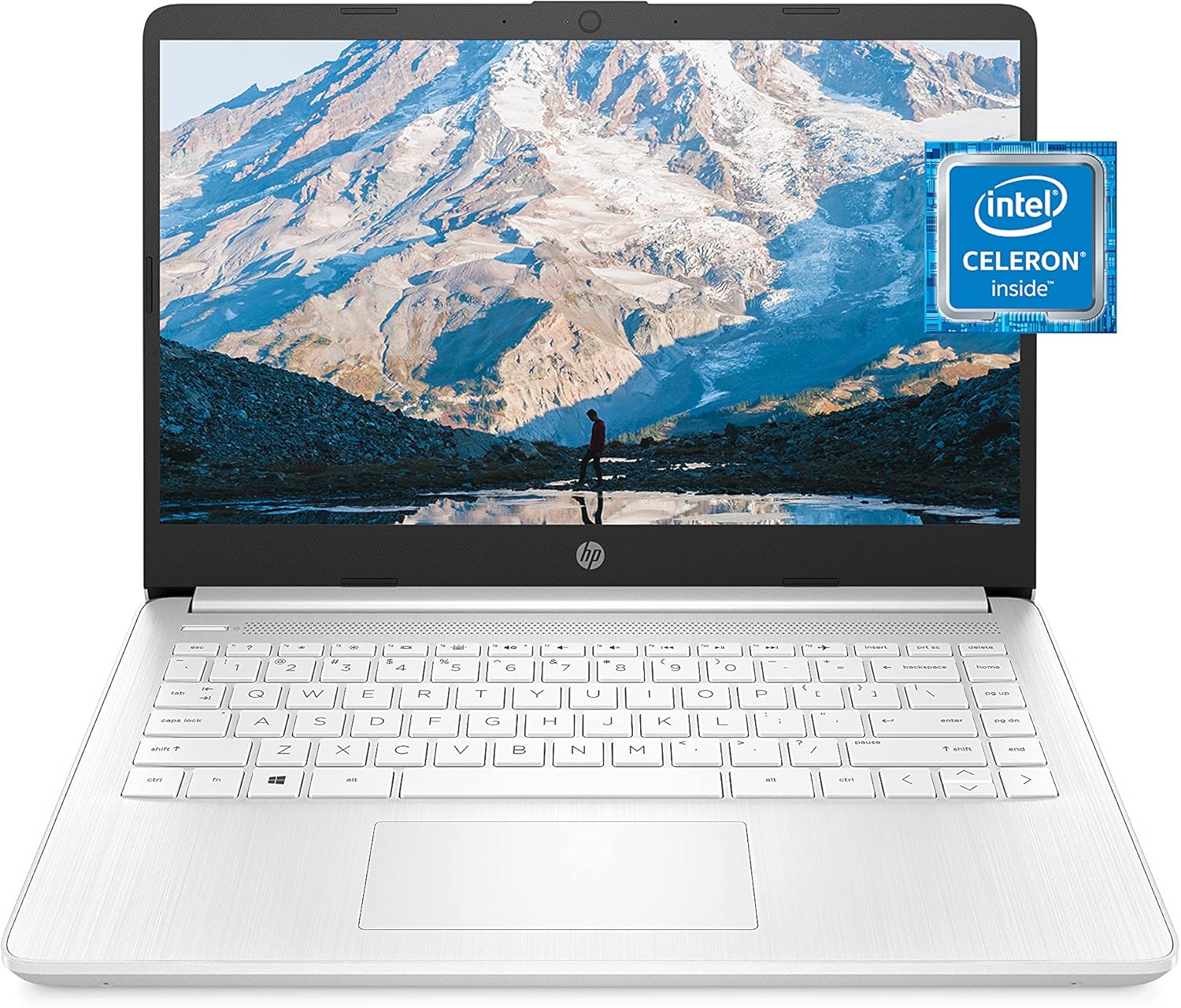
HP 14 Celeron Laptop Review: Best for Students? (2025)

Jump to Sections
- Introduction: The Value Proposition
- Target User: Who is this HP Laptop for?
- Key Features & Specifications
- Design and Portability: The Ultra-Portable Build
- Performance: Intel N4020 & 4GB RAM
- The Microsoft 365 Bonus: A Productivity Power-Up
- Display Analysis: The 14-inch Micro-Edge HD Screen
- Storage Explained: 64GB eMMC and the Cloud
- Understanding Windows 11 in S Mode
- Connectivity for School and Office
- Battery Life for All-Day Productivity
- Keyboard and Touchpad Experience
- Audio and Webcam for Online Classes
- Customer Reviews & Ratings Analysis
- What We Like About the HP 14 Celeron Laptop
- What We Don’t Like About the HP 14 Celeron Laptop
- Who Should Buy This HP 14 inch Laptop with Office 365?
- Where to Buy (Amazon Link)
- Warranty & Support
- Tips for Best Use
- Maintenance & Care Instructions
- Frequently Asked Questions (FAQ)
- Final Verdict: Is This HP Laptop Worth It?
- Related Reviews & Gear
Introduction: The Value Proposition
In the search for the best budget laptop for students with Windows 11, the HP 14 Celeron Laptop emerges as a strong contender. It’s a device that smartly bundles essential features—portability, long battery life, and crucial productivity software—into an incredibly affordable package. It’s designed for users who need a reliable machine for everyday tasks without the complexity or cost of high-end models.
HP’s core value proposition is clear: deliver a complete, ready-to-use solution right out of the box. By combining an efficient Intel Celeron N4020 processor with the modern Windows 11 OS and including a 1-Year Microsoft 365 subscription, this laptop is primed for schoolwork, light office tasks, and web browsing. This in-depth review will explore every aspect of this lightweight HP laptop, from its real-world performance to its battery life, to help you decide if it’s the perfect fit for your needs.
Target User: Who is this HP Laptop for?
The HP 14 Celeron Laptop is engineered for individuals who need a straightforward and affordable device for essential tasks. Its ideal user is someone who values portability, long battery life, and immediate access to productivity tools like Word and Excel. This makes it a perfect fit for:
- Students: For online research, writing essays, and attending virtual classes, this laptop provides the necessary tools in a lightweight package. The included Microsoft 365 is a huge bonus for schoolwork.
- Home Users: An excellent device for managing household budgets, online shopping, social media, emails, and streaming videos.
- Travelers: Its ultra-portable design and long battery life make it an ideal companion for those who need to stay productive on the move.
It’s important to note that this is not a device for power users. The Intel Celeron N4020 processor and 4GB of RAM are not suited for demanding software like Adobe Photoshop, professional video editing, or modern gaming.
Key Features & Specifications
- Processor: Intel Celeron N4020 Dual-Core for reliable everyday performance.
- Memory: 4GB RAM for essential multitasking.
- Storage: 64GB eMMC for fast boot-ups and essential applications.
- Display: 14-inch HD (1366×768) micro-edge display.
- Operating System: Windows 11 Home in S Mode for a modern and secure user experience.
- Bonus Software: Includes a 1-Year subscription to Microsoft 365 Personal (Word, Excel, PowerPoint, Outlook, and 1TB OneDrive).
- Graphics: Intel UHD Graphics with 4K support for streaming.
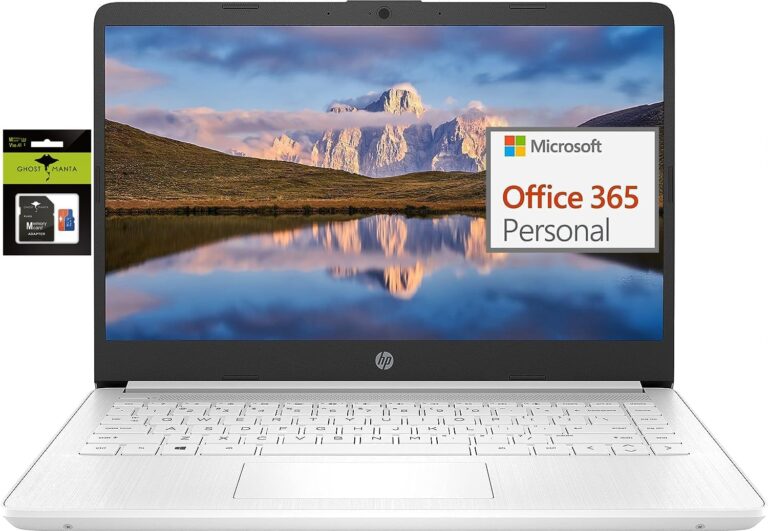
- Design: Ultra-portable, thin, and lightweight Snowflake White design.
Design and Portability: The Ultra-Portable Build
The HP 14 Celeron Laptop lives up to its “ultra-portable” description with a design focused on mobility. Its slim profile and lightweight construction make it incredibly easy to carry in a backpack, making it a great choice for school, the office, or travel. The beautiful Snowflake White finish gives it a clean and modern look that stands out.
Despite its compact size, the laptop features a full-sized keyboard that is comfortable for extended typing sessions. The build quality is solid for its price range, designed to handle the demands of a user who is always on the move. It’s a practical and stylish machine built for productivity anywhere.
Performance: Intel N4020 & 4GB RAM
It’s important to set the right expectations for the performance of this HP Celeron N4020 laptop. The Intel Celeron N4020 is an entry-level dual-core CPU designed for efficiency and basic tasks. It handles web browsing, email, video streaming, and Microsoft Office applications without a problem. However, the 4GB of RAM means it’s not suited for heavy multitasking with dozens of open tabs or running demanding software. Windows 11 on 4GB of RAM can feel sluggish if you push it too hard, so it’s best for single-tasking or light multitasking.
The Microsoft 365 Bonus: A Productivity Power-Up
Adding incredible value to the package, this HP laptop includes a 1-year subscription to Microsoft 365 Personal. This is a huge bonus for students and professionals, giving you immediate access to premium productivity apps:
- Word, Excel, and PowerPoint: The full, powerful versions of the essential office suite.
- Outlook: An ad-free email and calendar experience.
- 1TB of OneDrive Cloud Storage: This massive amount of cloud storage perfectly complements the laptop’s 64GB internal drive, giving you a secure place to store all your documents, photos, and files.
This subscription alone is a significant saving and makes the laptop a complete, ready-to-use productivity solution from the moment you turn it on.
Display Analysis: The 14-inch Micro-Edge HD Screen
To keep the price accessible, the HP 14 Celeron Laptop features a 14-inch HD display with a resolution of 1366×768. While this is not as sharp as a Full HD (1080p) screen, it is perfectly adequate for its intended tasks, such as writing documents and browsing the web. The “micro-edge” design means the bezels around the screen are thin, providing a more modern look and immersive viewing experience.
Storage Explained: 64GB eMMC and the Cloud
The HP laptop with 4GB RAM and 64GB storage uses eMMC for its internal drive. eMMC (embedded MultiMediaCard) provides fast boot times and quick access to your most-used applications, feeling much faster than an old hard drive. However, the 64GB capacity is limited. This is where the included 1TB of OneDrive storage from the Microsoft 365 subscription becomes essential, offering a seamless solution for storing all your larger files securely in the cloud.
Understanding Windows 11 in S Mode
This HP laptop comes with Windows 11 in S Mode, a streamlined version of Windows designed for security and performance. It exclusively runs apps from the Microsoft Store, which helps protect your device from malware and keeps it running fast. For most users, this is perfect for everyday tasks. If you need to install an app from outside the store (like Google Chrome), you can switch out of S Mode to the full version of Windows 11 Home for free through the Microsoft Store. Just be aware that this is a one-way switch.
Connectivity for School and Office
This HP laptop offers a robust selection of ports for a slim device. It includes modern essentials like USB-C and USB-A ports for your peripherals, and an HDMI port for connecting to an external monitor or TV. This ensures you can connect all your essential devices without needing extra adapters.
Battery Life for All-Day Productivity
The HP 14″ Laptop is designed for users on the move, and its battery life reflects that. Thanks to the power-efficient Intel Celeron N4020 processor, you can expect long hours of use on a single charge, easily getting you through a full day of classes or meetings without needing to hunt for a power outlet.
Keyboard and Touchpad Experience
The laptop features a full-sized keyboard that is comfortable for long typing sessions, with well-spaced keys that provide a good tactile feel. The large touchpad is responsive and supports multi-touch gestures, allowing for smooth and precise navigation through Windows 11.
Audio and Webcam for Online Classes
For video calls and online classes, the HP 14″ laptop is well-equipped. The built-in speakers are clear enough for virtual meetings and casual media consumption. The HD webcam provides adequate image quality, ensuring you can stay connected with colleagues, teachers, and classmates.
Customer Reviews & Ratings Analysis
Customers who have purchased the HP 14″ Celeron Laptop consistently praise its value and portability. Here’s what some are saying:
- Amanda (Jul 2025): “I bought this Chromebook for college. The battery lasts almost a full day, and it’s very light to carry around campus.”
- Brian (Jun 2025): “Great for simple tasks and online classes. It’s fast and secure. Love the thin design.”
- Rachel (May 2025): “Perfect budget laptop. Streams videos in high quality and boots up quickly.”
The general consensus is that it’s a reliable and speedy machine for its price, with the included Office 365 subscription being a major highlight.
What We Like About the HP 14 Celeron Laptop
- Microsoft 365 Included: A 1-year subscription with 1TB of cloud storage adds tremendous value.
- Excellent Portability: Ultra-slim, lightweight, and easy to carry.
- Long Battery Life: Lasts through a full day of light use.
- Affordable Price: Offers an incredible feature set for the cost.
- Modern Design: The Snowflake White finish and micro-edge display look great.
What We Don’t Like About the HP 14 Celeron Laptop
- Limited 4GB RAM: Not ideal for heavy multitasking.
- Entry-Level Processor: The Celeron N4020 is only suitable for basic tasks.
- Basic HD Display: The 1366×768 resolution lacks the sharpness of Full HD.
- Small Internal Storage: 64GB eMMC relies heavily on cloud storage.
Who Should Buy This HP 14 inch Laptop with Office 365?
The HP 14 Celeron Laptop is a fantastic choice for:
- Students who need a lightweight, affordable laptop with Microsoft Office for their studies.
- Business users looking for a portable secondary device for emails and document editing.
- Anyone who wants a complete productivity package right out of the box, thanks to the included Microsoft 365 subscription.
Where to Buy (Amazon Link)
The HP 14″ Celeron Laptop is available on Amazon. Purchasing through Amazon often provides competitive pricing, fast shipping options, and access to a wealth of user reviews to help inform your decision. Click any of the “Buy Now” links in this article to check the latest price and availability.
Warranty & Support
HP typically provides a one-year limited hardware warranty for its laptops, along with technical support for software and initial setup. This ensures your device is protected against manufacturing defects and gives you access to help when you first get started.
Tips for Best Use
- Activate Office 365: Don’t forget to activate your free 1-year subscription to get access to all the apps and 1TB of cloud storage.
- Utilize OneDrive: Set OneDrive to automatically sync your important folders to make the most of your cloud storage.
- Switch Out of S Mode (If Needed): If you need to install apps like Google Chrome, switch out of S Mode through the Microsoft Store.
Maintenance & Care Instructions
This laptop is low-maintenance. Keep Windows 11 updated to ensure you have the latest security and performance improvements. To keep it clean, use a soft, microfiber cloth to gently wipe the screen and chassis. Avoid using harsh chemicals.
Frequently Asked Questions (FAQ)
Can I upgrade the RAM or storage on this laptop?
The 4GB of RAM is typically soldered and not user-upgradeable. The 64GB eMMC storage is also integrated. For additional storage, it is highly recommended to use the included 1TB of OneDrive cloud storage or an external USB drive.
Is this laptop good for gaming?
This laptop is not designed for gaming. The Intel Celeron N4020 processor and integrated graphics are suitable for very light, casual games or browser-based games, but not for modern, demanding titles.
What happens after the 1-year Microsoft 365 subscription ends?
After the first year, you will need to purchase a new subscription to continue using the premium features of Microsoft 365, including the 1TB of OneDrive storage. You can still use the free web versions of Word, Excel, and PowerPoint through a service like Office.com.
Final Verdict: Is This HP Laptop Worth It?
The HP 14 Celeron Laptop is a standout device in the budget category due to its incredible value package. The inclusion of a 1-year Microsoft 365 subscription makes it an unbeatable productivity tool for the price. It successfully delivers a reliable experience for everyday tasks like browsing, streaming, and document editing.
While its performance is limited by the entry-level processor and 4GB of RAM, these are expected trade-offs. For students, business users, and anyone who needs a complete, ready-to-go laptop for light productivity, this HP laptop is a smart, practical, and highly recommended purchase.

One Comment